Your CRM has a dev loop
Plugins are real C# against a typed SDK — scaffolded, validated, registered, executed, and time-travel debugged without leaving VS Code.
Plugin model
Three kinds of plugin, one language
Server plugins for data logic, form plugins for UI behavior, action plugins for commands — all C# class libraries with full IntelliSense, your test framework, and normal code review.
Server
Runs in the data pipeline on create/update/delete. Typed access to the target record plus ICrmService for queries, writes, and actions.
Form
Reacts to form load and field changes through IFormExecutionContext — 30+ typed UI actions like setting requirement, visibility, and focus.
Action
Backs toolbar buttons with arguments. Same form context, fired on click, with field mutations applied back to the open form.
VS Code extension · early access
Time-travel debug your plugins
The CosmicXRM VS Code extension scaffolds plugins, validates on save with in-editor diagnostics, registers to a connected environment, and runs your code in the sandbox with an input-vs-modified diff. Then the part you don't get anywhere else: step through a recorded execution — timeline, live variables, and the active line lit in your source.
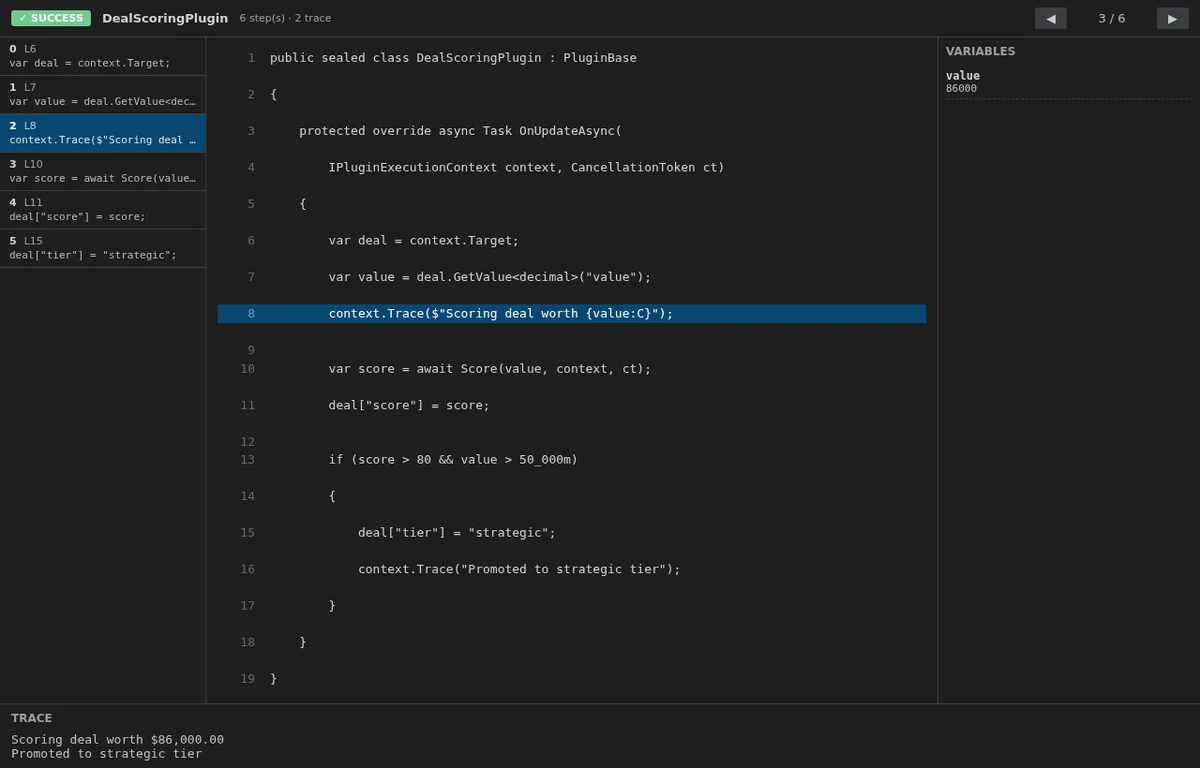
Scaffold & register
CXRM: Create Plugin templates all three kinds; registration uploads source — including multi-file shared libraries — straight to your environment.
Run in the sandbox
CXRM: Run Plugin executes against the test sandbox: reads hit live data, writes roll back, and you get an input-vs-modified diff.
Debug the whole pipeline
CXRM: Pipeline Debug replays every plugin registered on an entity and message, in order, in the same time-travel view.
The extension is in early access. Get in touch to try it.
API
An API that mirrors your model
Everything the apps do goes through the REST API, described by an OpenAPI document that reflects your metadata. Authenticate interactively with Microsoft Entra ID, or machine-to-machine with scoped API keys.
The same typed SDK your plugins use is available for integration code, so queries and writes look identical inside and outside the platform.
# Records, queries, and actions over REST
curl https://your-env/api/env/main/deal \
  -H "X-Api-Key: $CXRM_KEY" \
  -d '{ "name": "Carraway renewal",
        "value": 86000 }'
Build on it
Deploy from Azure Marketplace and write your first plugin today.